Know where the money went, while the month can still be saved.
A personal expense book that scores every month against a budget you set, tells you the day you slip off pace, and keeps the whole record in one file on your own device. No account. No server. Nothing leaves the phone.
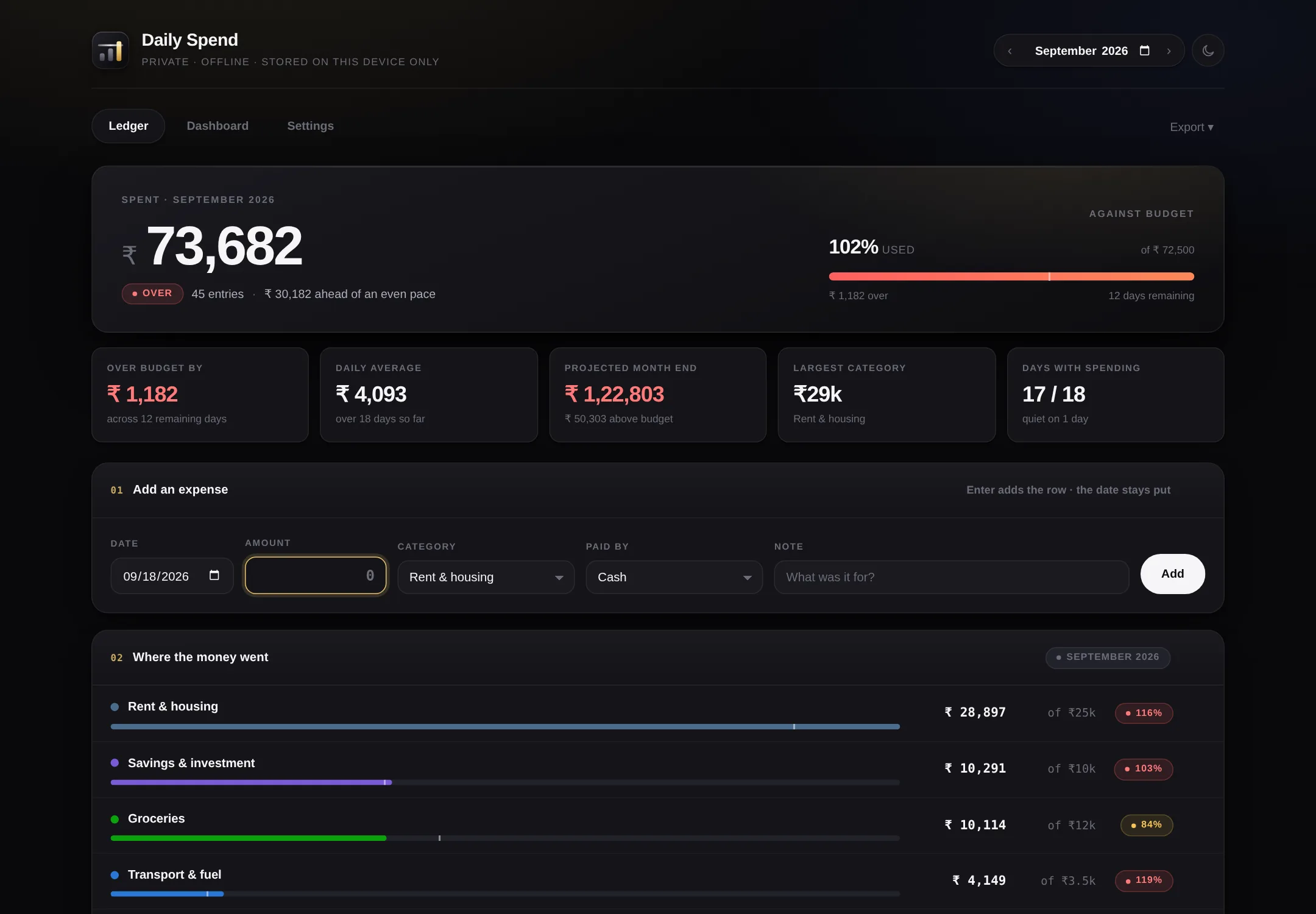
The figures above are a made-up month. Open it and they are the first thing you see too.
Three things go wrong with money, and all three go wrong quietly.
The statement arrives after the fact
It lands on the third and tells you about a month you can no longer do anything about. By then the only thing left to do is feel bad about it.
The budget is a wish
A figure you carry in your head, never set against anything, quietly broken by the twelfth — and you find out in January that it was broken in March.
The small ones do the damage
Everyone remembers the rent. Nobody remembers four hundred rupees, eleven times. That is where the month actually goes.
It scores the month. It does not just add it up.
Any app can total a column. The useful question is whether this month is going well, and if not, which part of it broke — asked early enough that the answer is still worth something.
A budget for each category, not one number for everything
Groceries has its own limit. So does eating out. Each one goes green, amber or red on its own, so you can see which one broke, not just that something did.
Pace, while there is still time to use it
On the twelfth it tells you that you are ₹4,000 ahead of an even pace with eighteen days still to run. That is a number you can act on. A month-end total is not.
The whole ledger, not a summary
Every entry keeps its date, its category, how it was paid and a note. Search it, filter it across months, take the lot out as a spreadsheet whenever you want.
Two taps on a phone
A keypad, a category chip, done. It is built to be used standing at a counter, not sitting at a desk at the end of the week trying to remember.
Start wherever suits you. Nothing is wasted if you move.
Open it in the browser
Nothing to install, no card, no login. A sample month is loaded so there is something to look at. Everything stays in your browser.
- Works on any computer or phone
- Clear the sample, start your own
- Nothing reaches us, ever
Download the free edition
Two apps, one zip, about 175 KB. Keep them on a laptop, a pen drive, wherever. They work with the internet switched off and they do not expire.
- Desktop and phone versions
- Budgets, dashboard, spreadsheet export
- No email address asked for
Cloud
Sign in and the same book follows you from phone to laptop. Receipt photos, recurring expenses posted for you, and a nudge when a category is about to go over.
- Sync across every device
- Receipt photos, kept off the phone
- Budget alerts and a monthly email
It goes on the home screen and opens like an app.
There is no app store, no download, no update to accept. You open the page once, add it to your home screen, and after that it launches full screen with its own icon — no address bar, no browser tabs. It keeps working with no signal.
- iPhone: open it in Safari, tap Share, then Add to Home Screen
- Android: open it in Chrome, tap the menu, then Install app
- A keypad built for amounts, not a tiny text box
- Swipe left or right to move between months
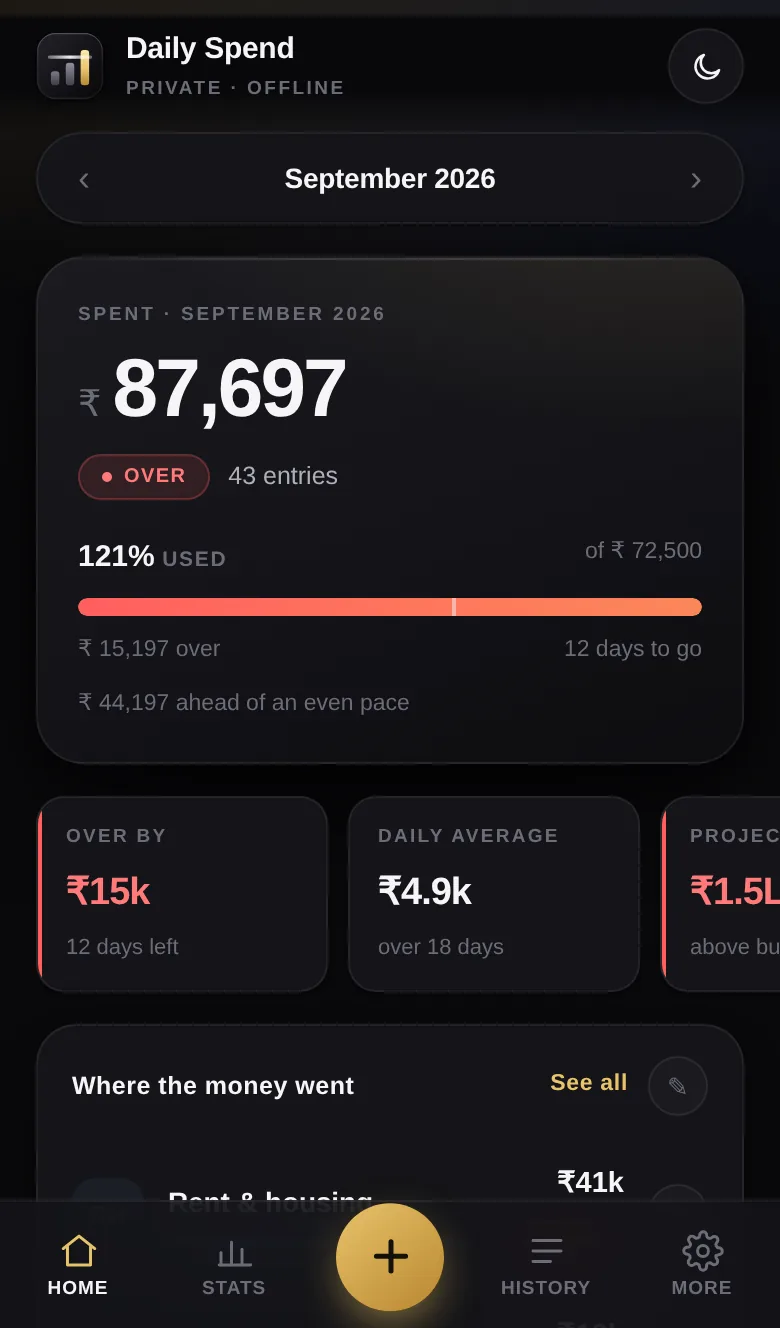
Four steps, and the fourth one is optional.
Set what each category is allowed
Eleven are there to start with, and sensible figures in each. Change the names, the colours and the limits until they look like your life. Two minutes.
Add expenses as they happen
Amount, category, how you paid. On the phone that is a keypad and two chips. Shorthand works
— type 2.5k and it files 2,500.
Look at it once a week
The top of the screen tells you the score, what is left, and whether you are ahead of pace. The dashboard tells you which month is drifting and which category is doing it.
Take it out, or back it up
Spreadsheet, CSV, a picture for a message, or the whole thing as a backup file. It is your record; it should be able to leave.
The honest comparison.
The free edition is the whole expense book and it stays free. What it cannot do is the part that needs a server that is awake when you are not.
| Free edition | Cloud | |
|---|---|---|
| Cost | Nothing, forever | ₹149 a month |
| Where the figures live | Your device only | Your device, and your account |
| Budgets per category, scoring, pace | Yes | Yes |
| Dashboard, trends, category grid | Yes | Yes |
| Spreadsheet and CSV export | Yes | Yes |
| Works with no internet | Yes | Yes |
| Phone and laptop showing the same book | Restore a backup by hand | Automatic |
| Receipt photographs | — | Yes |
| Recurring expenses posted for you | — | Yes |
| An alert before a category goes over | — | Yes |
| Monthly summary by email | — | Yes |
| Shared book with someone at home | — | Yes |
| If you lose the device | Gone, unless you kept a backup | Sign in again |
One price, and a free edition that is not a trial.
Free edition
- The whole expense book
- Desktop and phone
- Works offline
- Export and backup
Cloud
- Everything in the free edition
- Sync across every device
- Receipt photos
- Recurring expenses
- Budget alerts and monthly email
- One shared book at home
Running a business?
This is the personal one. If what you actually need is a daily audit across several shops, with owners and dates on every failure, that is the other product.
Prices in Indian rupees. The cloud version is in build — see what is coming and when.
Questions people actually ask.
Is it really free, or free for now?
Free. The file is yours once you have it and it does not phone home, so there is no switch for us to flip. The cloud version is the paid thing, and it is a separate decision you can keep not making.
Can you see what I spend?
No. The free edition has no server in it at all — open it with the network off and it behaves identically. Your figures sit in your own browser's storage on your own device. We could not look even if we wanted to.
What happens if I clear my browser data?
You lose the lot. This is the honest cost of keeping everything on your device and nothing on ours. Write a backup now and then — Settings, then Backup — and keep the file somewhere that is not that device. The cloud version exists largely to solve this.
Will it work on an old phone?
If the browser was updated some time in the last five years, yes. There is no framework in it and nothing to download after the first open. It is one page.
Can I use it on my phone and my laptop?
In the free edition each device keeps its own copy, and you move between them by writing a backup on one and restoring it on the other. It works, but it is a deliberate act and it is easy to forget. If you want them to simply agree with each other, that is what the cloud version is for.
Does it do income, or is it only spending?
Only spending, on purpose. The moment it tries to be a full personal accounting system it stops being something you will actually open on a Tuesday. If you need both sides of the book, a spreadsheet is honestly better.
Can I get my figures out?
Spreadsheet with three tabs, CSV, a PNG for a message, a printable PDF, and a full JSON backup. Any of them, any time, without asking us.
What if I outgrow it?
Then move to the cloud version, or take your spreadsheet and go somewhere else entirely. The export exists so leaving is a normal thing to do, not a punishment.
It takes about two minutes to find out whether it suits you.
No sign-up, and a sample month is already in there.